





JavaScript / TypeScript からブラウザ上でバーコードを生成できます。
PNG画像(Base64)とSVGベクターの2種類の出力形式に対応しています。
最新リリース情報
barcode.wasm 1.1.02026年8月24日 リリース
QRコードの英数字モードのエンコード処理を修正しました。
購入者メールアドレスを埋め込んだ製品版の自動発行に対応しました。
2025年12月 リリース
WebAssembly(WASM)によるバーコード生成ライブラリの初回リリース。
JavaScript / TypeScript 環境で、ブラウザ上でバーコードを生成できます。
PNG(Base64)出力とSVGベクター出力の両方に対応。
今回のリリースについて、多くのメディアでご紹介いただいております。ありがとうございます。
製品概要
ブラウザで完結
WebAssemblyにより、サーバー通信不要でブラウザ上だけでバーコードを生成できます。
高速描画
C++からコンパイルされたWASMにより、ネイティブに近い高速な描画を実現。
PNG画像出力(Base64)
バーコードをBase64形式のPNG画像として出力。imgタグのsrcに直接設定できます。
SVGベクター出力
拡大しても劣化しないSVG形式で出力。印刷や高解像度ディスプレイに最適です。
JavaScript / TypeScript
JavaScript、TypeScriptどちらからでも利用可能。Vite等のモダン環境にも対応。
npmパッケージ
npmからインストール可能。@pao-at-office/barcode-wasm
GitHub
サンプルコードをGitHubで公開。HTML版・TypeScript版
対応バーコード
| 分類 | 対応バーコード |
|---|---|
| 1次元バーコード |
|
| 2次元バーコード |
|
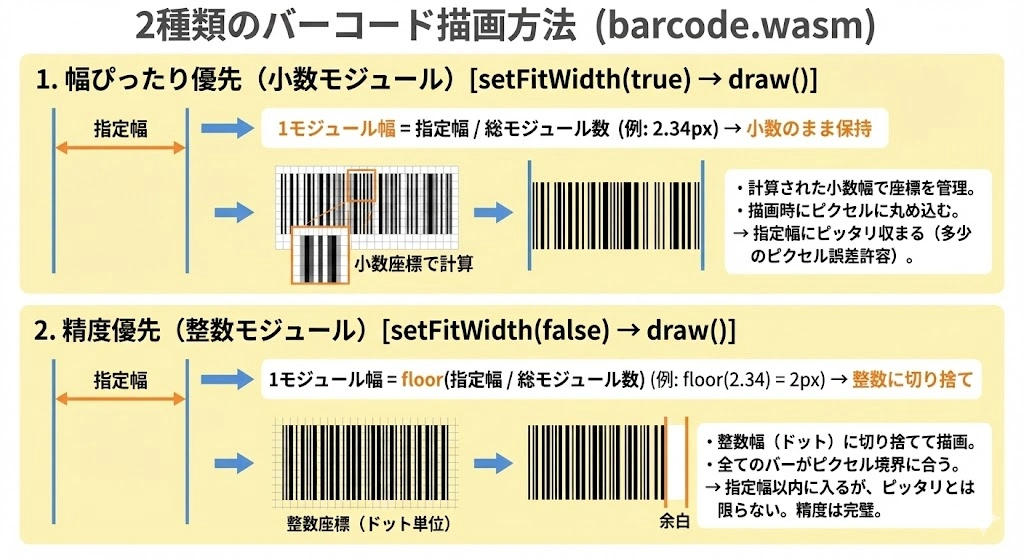
2種類のバーコード描画方法
各バーコードには、それぞれ描画方法が異なる次の2種類のバーコード描画メソッドが用意されております。
製品価格・ライセンス
価格:
- 1開発ライセンス:22,000円(税込) / 20,000円(税抜)
※必要開発ライセンス数:Barcode.wasmを利用して開発するパソコンの台数分必要になります。
※ランタイムライセンス:無償で提供されます。開発環境にのみライセンスが必要です。お客様環境など開発環境ではない場合は、配布は無償です。
デモ・ダウンロード
試用版には「SAMPLE」の透かしが表示されます。製品版をご購入いただくと透かしなしでご利用いただけます。
HTML単体版
HTMLファイル1つで動作するシンプルなデモ。
PNG / SVG 両出力に対応。全バーコード種類を試せます。
TypeScript + Vite版
TypeScript環境での実践的なデモ。
Viteで開発サーバーを起動して使用します。
📦 その他の入手方法
サンプルコード
Barcode.wasm は JavaScript / TypeScript の両言語、PNG / SVG の両出力形式に対応しています。
用途に応じてお選びください。
出力形式の比較
| 出力形式 | 特徴 | 用途 |
|---|---|---|
| PNG(Base64) | ラスター形式。imgタグのsrcに直接設定可能。 | Web表示、メール添付、汎用的な用途 |
| SVG(ベクター) | 拡大しても劣化なし。CSSでスタイル変更可能。 | 印刷、高解像度ディスプレイ、拡大表示 |
JavaScript - PNG出力(Base64)
// WASMモジュールを初期化
import createBarcodeModule from './wasm/barcode.js';
const module = await createBarcodeModule();

// Code39バーコードを生成(PNG)
const barcode = new module.Code39();
barcode.setShowText(true);
barcode.setOutputFormat('png');  // PNG出力(省略可)

const base64 = barcode.draw('HELLO123', 400, 100);
document.getElementById('barcode').src = base64;  // imgタグに設定

barcode.delete();  // メモリ解放(必須)
JavaScript - SVG出力(ベクター)
// WASMモジュールを初期化
import createBarcodeModule from './wasm/barcode.js';
const module = await createBarcodeModule();

// Code39バーコードを生成(SVG)
const barcode = new module.Code39();
barcode.setShowText(true);
barcode.setOutputFormat('svg');  // SVG出力を指定

const svg = barcode.draw('HELLO123', 400, 100);
document.getElementById('container').innerHTML = svg;  // HTMLに直接挿入

// ダウンロード用にBlobを作成
const blob = new Blob([svg], { type: 'image/svg+xml' });
const url = URL.createObjectURL(blob);

barcode.delete();  // メモリ解放(必須)
TypeScript - PNG出力(Base64)
// 型定義
interface BarcodeModule {
  Code39: new () => Barcode1D;
  QR: new () => Barcode2D;
}

interface Barcode1D {
  setShowText(show: boolean): void;
  setOutputFormat(format: string): void;
  draw(data: string, width: number, height: number): string;
  delete(): void;
}

// WASMモジュールを初期化
const Module = await import('./wasm/barcode.js');
const module: BarcodeModule = await Module.default();

// Code39バーコードを生成(PNG)
const barcode = new module.Code39();
barcode.setShowText(true);
barcode.setOutputFormat('png');

const base64: string = barcode.draw('HELLO123', 400, 100);
(document.getElementById('barcode') as HTMLImageElement).src = base64;

barcode.delete();
TypeScript - SVG出力(ベクター)
// WASMモジュールを初期化
const Module = await import('./wasm/barcode.js');
const module: BarcodeModule = await Module.default();

// Code39バーコードを生成(SVG)
const barcode = new module.Code39();
barcode.setShowText(true);
barcode.setOutputFormat('svg');

const svg: string = barcode.draw('HELLO123', 400, 100);
(document.getElementById('container') as HTMLDivElement).innerHTML = svg;

// ダウンロードリンクを作成
const blob = new Blob([svg], { type: 'image/svg+xml' });
const url = URL.createObjectURL(blob);
const link = document.getElementById('download') as HTMLAnchorElement;
link.href = url;
link.download = 'barcode.svg';

barcode.delete();
QRコード生成
// QRコード(PNG出力)
const qr = new module.QR();
qr.setStringEncoding('utf-8');        // 日本語対応
qr.setErrorCorrectionLevel('M');      // 誤り訂正レベル
qr.setOutputFormat('png');

const base64 = qr.draw('https://www.pao.ac/ 日本語OK', 300);
document.getElementById('qr').src = base64;
qr.delete();

// QRコード(SVG出力)
const qrSvg = new module.QR();
qrSvg.setStringEncoding('utf-8');
qrSvg.setErrorCorrectionLevel('M');
qrSvg.setOutputFormat('svg');

const svg = qrSvg.draw('https://www.pao.ac/', 300);
document.getElementById('qr-container').innerHTML = svg;
qrSvg.delete();
npmパッケージを使用する場合
import { initBarcodeModule } from '@pao-at-office/barcode-wasm';

// モジュールを初期化
const module = await initBarcodeModule({ wasmPath: '/barcode.wasm' });

// Code39バーコードを生成(PNG)
const barcode = new module.Code39();
barcode.setShowText(true);
barcode.setOutputFormat('png');
const base64 = barcode.draw('HELLO123', 400, 100);
document.getElementById('barcode').src = base64;
barcode.delete();

// Code39バーコードを生成(SVG)
const barcodeSvg = new module.Code39();
barcodeSvg.setShowText(true);
barcodeSvg.setOutputFormat('svg');
const svg = barcodeSvg.draw('HELLO123', 400, 100);
document.getElementById('container').innerHTML = svg;
barcodeSvg.delete();
WASMモジュール初期化(HTML + JavaScript)
<!DOCTYPE html>
<html lang="ja">
<head>
    <meta charset="UTF-8">
    <title>Barcode.wasm サンプル</title>
</head>
<body>
    <img id="barcode" alt="バーコード">
    <div id="svg-container"></div>

    <script type="module">
        import createBarcodeModule from './wasm/barcode.js';

        const module = await createBarcodeModule({
            locateFile: (path) => {
                if (path.endsWith('.wasm')) {
                    return './wasm/barcode.wasm';
                }
                return path;
            }
        });

        // PNG出力
        const barcode = new module.Code39();
        barcode.setOutputFormat('png');
        document.getElementById('barcode').src = barcode.draw('PNG-TEST', 300, 80);
        barcode.delete();

        // SVG出力
        const barcodeSvg = new module.Code39();
        barcodeSvg.setOutputFormat('svg');
        document.getElementById('svg-container').innerHTML = barcodeSvg.draw('SVG-TEST', 300, 80);
        barcodeSvg.delete();
    </script>
</body>
</html>
動作環境
- WebAssembly対応ブラウザ(Chrome, Firefox, Safari, Edge 等)
- Node.js 16以上(TypeScript版の開発時)
- Vite, Webpack 等のモダンなバンドラー(TypeScript版使用時)
サポート
製品のサポートは情報共有のため で行わせていただいております。
個別にメールinfo@pao.acも多くいただいております。 どちらでも結構です。お問い合わせ・ご意見・ご要望等よろしくお願いいたします。
本製品(Barcode.wasm)の保守・保証につきましては、 保守・保証に関する規定をご覧ください。